Two short recordings. One organized turnover record.
TurnAudit turns the walkthrough your cleaner already does into a sealed uploaded original, a reported timestamp state, and a clearly labeled advisory AI review.
From property setup to an exportable record
- Add your property.
- In Cleaner-managed mode, the invited, assigned cleaner records the guest-ready baseline by default; you can record it instead.
- Confirm your cleaner assignment or choose self-cleaning.
- Record the pre-clean and post-clean walkthroughs.
- Review the turnover and issue a claim package.
Setup time depends on the property and the number of rooms you document.
Record Before and After
After guest checkout, your invited cleaner opens a link and creates a quick browser account, then records a short pre-clean walkthrough room by room before cleaning changes the scene. There is no app-store download or special equipment. When cleaning is done, the same quick walkthrough records visible post-clean condition. Record 15-45 seconds per room and aim for 20-30 seconds, twice per turnover.
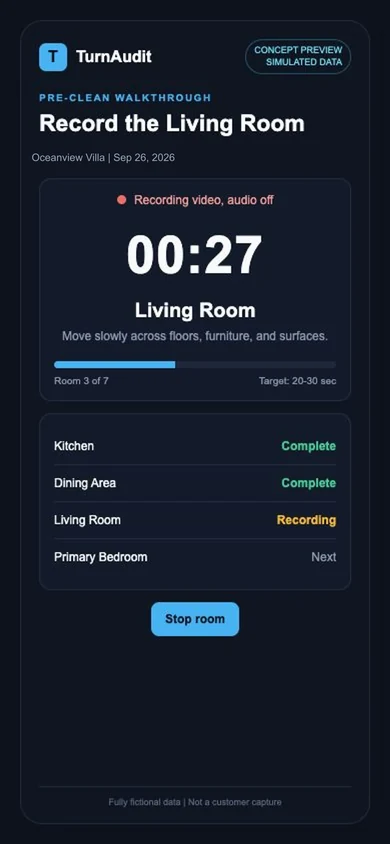
Concept preview: simulated cleaner capture data, September 26, 2026.
TurnAudit Seals the Originals
When each recording uploads, TurnAudit computes a SHA-256 fingerprint from the stored bytes and requests an independent RFC-3161 trusted timestamp. The receipt reports the timestamp state. The uploaded original is preserved byte-for-byte after upload.
Your evidence receipt reports Sealed, Timestamp granted, Still finalizing, or Contact support for each submitted recording. It is a monitored durability service objective, not a promise of claim outcomes.
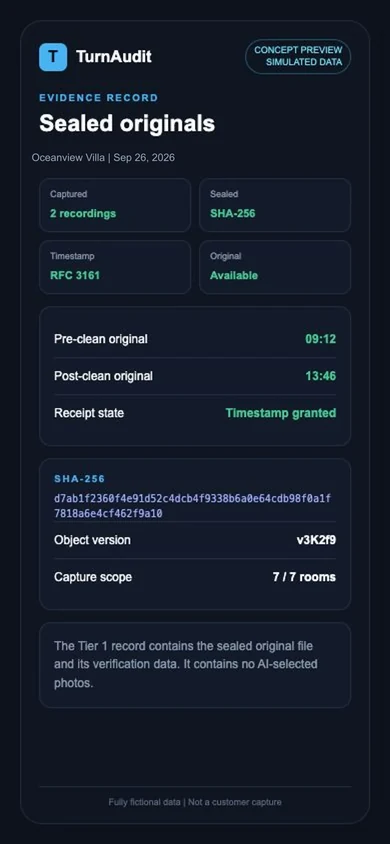
Concept preview: simulated sealed-record data, September 26, 2026.
Review With a Second Set of Eyes
When you choose an optional, credit-based AI review, TurnAudit reviews the selected walkthrough room by room and flags stains, damage, missing items, displaced furniture, and setup issues. Every flag points to the room and approximate moment in the recording so you can check it yourself. The AI is a second set of eyes: it can miss things, and you stay the judge.
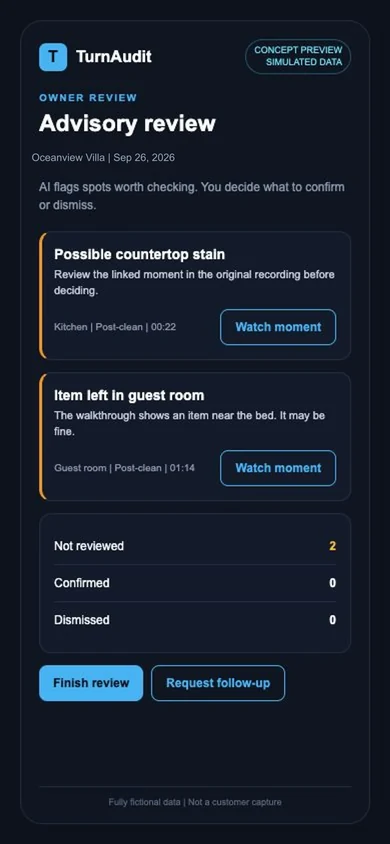
Concept preview: simulated advisory review data, September 26, 2026.
First step: record a baseline
Record your property once in guest-ready condition. In Cleaner-managed mode, the invited, assigned cleaner records the baseline by default; the host can record it instead. The host reviews the room labels. This baseline is a required first step: every pre-clean and post-clean comparison is made against it. It is easy to update whenever you redecorate.
What verification looks like
A platform reviewer, adjuster, or host can use standard tools to recompute the Tier 1 file’s SHA-256 fingerprint and check its RFC-3161 token when granted. Those checks address the uploaded file’s integrity and no-later-than timestamp, not recording time, location, operator, cause, completeness, or claim eligibility.
See how verification works →After the AI finishes, you're in control.
Review results, track trends, and build a documentation trail: all from your phone or desktop.
Review Flagged Issues
See every advisory review card with its linked footage. Confirm real problems or dismiss anything that's fine: one tap either way.
See Your Handoff History
Build a handoff history over time. See which turnovers needed follow-up and where your team could use support or retraining.
Issue a Claim Package
The host previews, confirms, and attests before issuing a frozen claim package. A complete property address is required. The package separates sealed originals, advisory material labeled not evidence, and optional host-supplied documents.
Monitor Property Health
Compare documented pre-clean and post-clean walkthroughs with the property baseline so visible condition changes can be easier to review over time.
Start your free trial today.
Use TurnAudit during your free trial.
Start your free trial and get a free turnover documentation checklist.
Add a property. In Cleaner-managed mode, the invited, assigned cleaner records the baseline by default; you can record it instead. Capture pre-clean and post-clean, then review and issue a claim package.
Your free trial covers one property for up to 5 documented turnovers or 14 days from your first trial turnover, whichever comes first, with one pre-clean and one post-clean AI review (properties up to 10 rooms). No card. Each turnover's record stays viewable and exportable for 90 days from when it was recorded. AI review is advisory. It does not determine damage, responsibility, cleanliness, or eligibility for any claim or reimbursement.